Web viewer
Caelum Viewer is the web viewer for caelum cameras. Pick a camera and a day, scrub through the night on a timeline, play it as a time-lapse, inspect any frame's metadata and download its RAW file. It has no backend of its own — it runs as static files and reads the data from one of two places:
- a storage server — the archive the cameras upload to (S3 or a web server), for public, long-term access to many cameras;
- the camera itself — straight from its API on your network, with no archive at all. See Straight from a camera.
Open Caelum Viewer →viewer.caelum.astrometers.eu
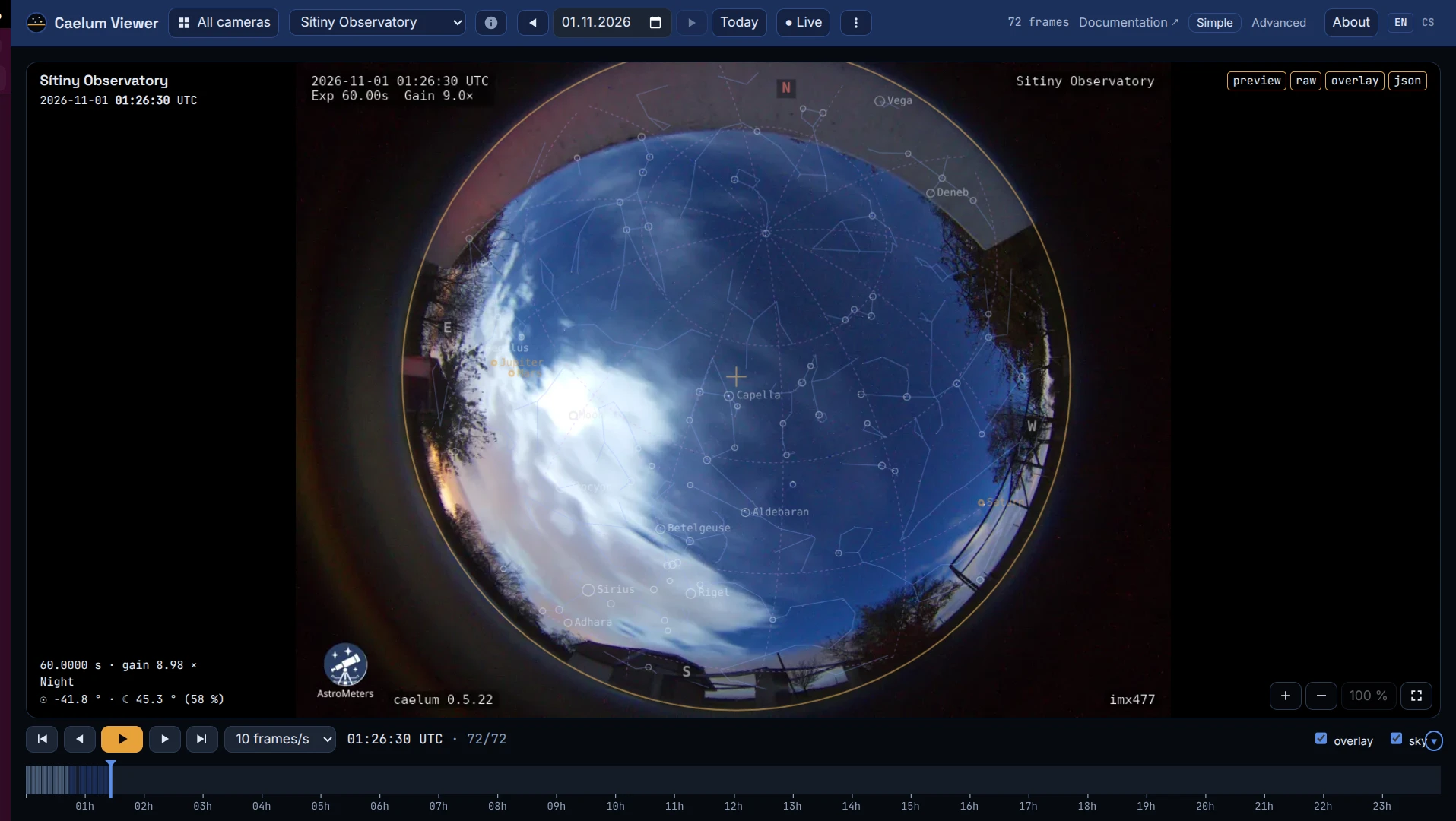
What it does
- Camera, day and time — chosen from a camera catalogue; the whole view state is in the URL, so any frame can be bookmarked or shared. Today jumps to the current UTC day.
- All cameras — with a catalogue, the All cameras button shows every camera side by side on one shared timeline. Playback and Live move all of them at once; click a camera to open it or to enlarge its frame. Frames more than an hour away from the chosen time are hidden, and in Live a camera whose newest frame is old is marked.
- Camera info — the ⓘ button describes the camera: station name, camera type, owner, position (if published), per-day frame counts and everything else its
manifest.jsoncarries, with a link to the file index of an https archive. - The sky over the picture — see below.
- Timeline — 24 hours UTC, coloured by sky period (day, civil, nautical and astronomical twilight, night). Click or drag to move through the day.
- Frame detail — zoom (wheel,
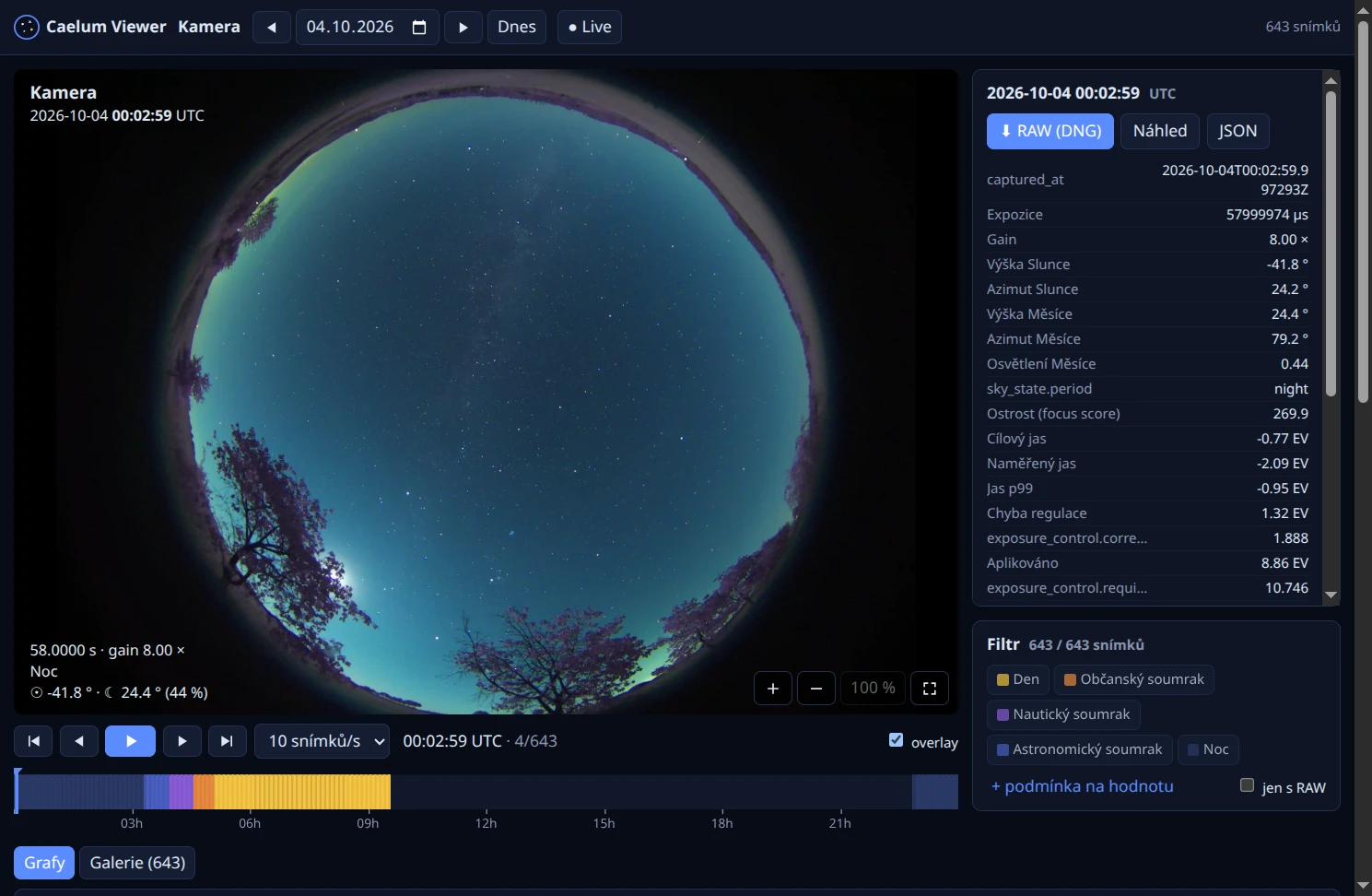
+/−), pan by dragging, fullscreen, and the overlay with time, exposure, gain, sky period, sun and moon on or off. - Metadata — the frame's full metadata as a table: exposure and gain, sun and moon position, moon illumination, focus score and the exposure-control values behind the frame.
- Downloads — the original RAW (DNG), the preview and the JSON metadata. RAW files are only ever fetched when you ask for one.
- Time-lapse — playback at 2–30 frames per second, preloading ahead.
- Section of the day — mark it with
[/]at the current frame or by Shift+dragging on the timeline; playback loops within it, it is kept in the URL andEsccancels it. - Export — the section (or the whole day), filtered frames only, as an MP4 video encoded in the browser (WebCodecs; optionally with the camera name and time burnt into the picture) or as a ZIP of the previews, optionally with their JSON metadata. Nothing is uploaded anywhere.
- Live — reloads every 30 s and shows the newest frame. When the newest frame is over an hour old, a banner warns that the camera may have stopped sending data; past a day the banner turns red.
- Charts — any numeric metadata over the day, with a cursor synchronised to the frame shown; click a chart to jump to that frame.
- Filters — by sky period, by value ranges of any metadata field and by whether a RAW exists. They apply to playback, the gallery and the charts.
- Gallery — the day's WebP thumbnails.
- About — the viewer's version, build commit and build time, and a link to this documentation.
- Language — English or Czech. The browser's language is used at first; the
EN/CSswitch overrides it and is remembered. - Installable — the viewer is a PWA, so a browser can install it as an app. On small screens the top bar folds its secondary items into a ⋮ menu.
The viewer opens in simple mode — image, overlay, playback and timeline only. Advanced mode adds the metadata, filter, export, gallery and chart panels; the section of the day and the export are available only there. The side panels can be collapsed (filter and export start collapsed). The browser remembers the chosen mode and which panels are open.
Without any source in the URL the viewer opens a start screen: recently viewed cameras (which can be pinned or removed) and a form for a catalogue or a single source.
Keyboard: ←/→ (with Shift, by 10), Home/End, Space plays, F fullscreen, +/−/0 zoom, L live, O overlay, [/] section start/end at the current frame, Esc cancels the section.
The sky over the picture
When the camera has a lens calibration and has published where it is, the viewer draws the sky over the frame itself, in the browser, for the moment the frame was taken. The sky checkbox switches it on; the ▾ next to it opens the menu:
- parts to show: lens outline and centre, horizon and altitude rings, ecliptic, RA/Dec circles (off at first), constellation lines, stars, Sun, Moon and planets, compass;
- sliders for the faintest star magnitude, the size of the symbols and the opacity of the whole layer.
Hovering a star or a planet names it. The settings are remembered by the browser. This is separate from the overlay with time and exposure, which the camera burns into the preview.
The viewer reads the lens and position from the camera's manifest.json (sky.lens and location) or, straight from a camera, from its /api/sky/setup. The position goes into the manifest only when the camera has camera.identity.publish_location on (see Upload); without it, an older caelum or a plain archive, the viewer shows the pictures as they are and offers no sky.
From a storage server
The viewer works with anything that can list a directory and serve files, and it expects caelum's on-disk layout (thumbnails/YYYY/MM/DD/…webp + .json, raw/YYYY/MM/DD/…dng):
| Source | type= | Notes |
|---|---|---|
| S3 bucket | s3 | publicly readable bucket; caelum's S3 upload writes exactly this |
| Web server directory listing | http-index | nginx (autoindex_format json), Caddy, or Apache's HTML listing |
| Archive without listings | caelum-manifest | reads the manifest.json / index.json caelum's uploader writes; no RAW |
| A camera on your network | caelum | straight from the camera's API — see below |
A single source goes in the URL:
https://viewer.caelum.astrometers.eu/?type=s3&endpoint=https://s3.example.org&bucket=allsky&prefix=camera01/
https://viewer.caelum.astrometers.eu/?type=http-index&source=https://data.example.org/camera01/
Several cameras go in a catalogue — a JSON file listing each camera's id, name and source (the cameras.json caelum's uploader writes is accepted too):
https://viewer.caelum.astrometers.eu/?catalog=https://example.org/cameras.jsonFurther parameters: camera=, date=YYYY-MM-DD, time=HH:MM[:SS] (UTC), live=1, from= / to=HH:MM[:SS] (section of the day, UTC), mode=simple|advanced, lang=en|cs.
For a single source without a catalogue, name= sets the camera's name and link= the address of its own web interface; thumbnails= and raw= change the folders that hold them if the layout differs from caelum's, and style=virtual makes an S3 source use virtual-hosted addressing (path style is the default).
CORS and public data
The data is on a different domain than the viewer, so the server has to send CORS headers allowing the viewer's origin, and the data has to be publicly readable — no keys ever go into the URL or the catalogue.
S3 — the bucket must also allow anonymous s3:ListBucket and s3:GetObject:
{ "CORSRules": [{ "AllowedOrigins": ["https://viewer.caelum.astrometers.eu"], "AllowedMethods": ["GET", "HEAD"], "AllowedHeaders": ["*"], "MaxAgeSeconds": 3600 }] }nginx:
location /allsky/ {
    autoindex on;
    autoindex_format json;
    add_header Access-Control-Allow-Origin "https://viewer.caelum.astrometers.eu" always;
}
Apache:
<Directory /var/www/allsky>
    Options +Indexes
    Header set Access-Control-Allow-Origin "https://viewer.caelum.astrometers.eu"
</Directory>
Straight from a camera
Give the viewer the camera's address. A camera installed with --proxy serves caelum over https on port 443, so pass its full URL:
https://viewer.caelum.astrometers.eu/?type=caelum&source=https://allsky.localThe viewer then reads the frames, metadata and RAW files from the camera's own API, including everything that was never uploaded anywhere. On the camera:
auth.preview_access: "public"in its config — a page from another domain never gets the camera's login cookie, so the frames must be readable without logging in. Seepreview_access.- The viewer's origin is allowed. caelum allows
https://viewer.caelum.astrometers.euby default; to allow another, setCAELUM_CORS_ORIGINS(comma-separated) in the camera's environment.
Self-signed certificate
The installer gives the camera a self-signed certificate, which the browser silently refuses for the viewer's background requests. Open the camera's own address (https://allsky.local/) in the same browser once and accept the certificate; from then on the viewer can reach it. A real certificate in /etc/caelum/tls/ removes the step.
A camera without --proxy answers plain http on port 8000 (source=192.168.1.50 means http://192.168.1.50:8000). Chrome and Edge allow that from the https viewer for LAN addresses after a one-time "access devices on your local network" prompt; Firefox and Safari block it as mixed content.
Publishing a camera
Turn on the camera's upload to an S3 bucket or a web server the viewer can read, then point the viewer at it. Want your camera on viewer.caelum.astrometers.eu? Contact AstroMeters at info@astrometers.eu.
Location is public
Each camera's location ends up in its public metadata. If the site is somebody's garden, set location to a rounded coordinate — the sky-state calculation does not need metre precision.